A guest menu by QR code
Photos, descriptions, prices and item options. Guests can browse on the web or in Telegram, in Russian, Spanish or English.
Learn moreCafePOS connects your menu, table orders, kitchen and bar. Waiters take orders on a phone, staff receive their items, and the owner manages the menu and team access.
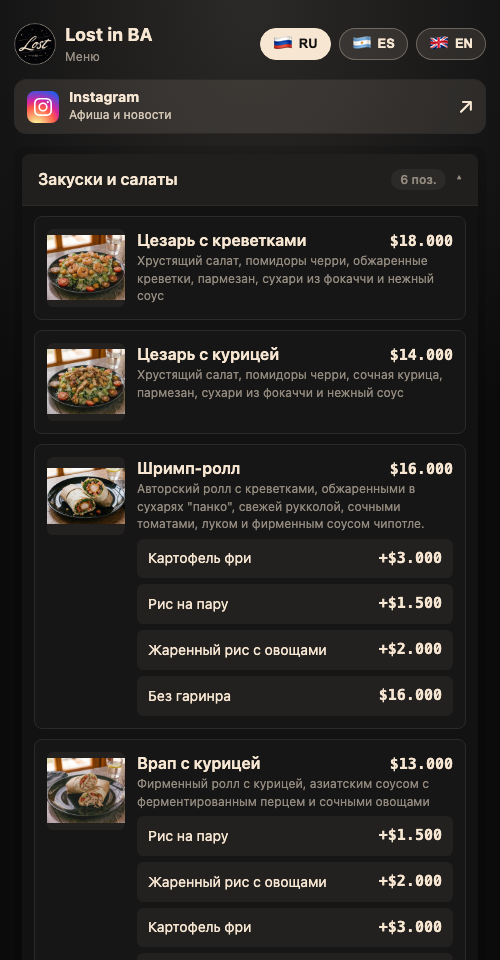
Photos, descriptions, prices and item options. Guests can browse on the web or in Telegram, in Russian, Spanish or English.
Learn moreChoose a table, add items and notes, then send the order. Items are routed to the kitchen and bar.
Learn moreStaff see their items and mark them ready. Kitchen dishes in one submission can be served as ready or together.
Learn moreGuests can open the menu in Telegram. The bot connection and table QR links are configured during setup.
Learn moreCafePOS workflow illustration
The waiter selects a table and sends the order
Kitchen and bar receive their items
Staff mark items ready and call the waiter
The team closes the bill and can find it in history
Use your name, logo and colours. Add an Instagram link for your café’s news and events.
Hide individual items or entire categories from guests while keeping them available to staff.
Waiters, bartenders, cooks, managers and owners have different permissions.
Move or merge bills, split payments and view history. Discounts can require a supervisor’s approval.
Explore the real CafePOS guest menu at Lost in BA: browse categories, photos and prices, choose a language and visit the venue’s Instagram. This is the café’s live menu.
Browsing the menu requires no registration. Contact MercadoBot for a walkthrough of staff screens.
Explore the menuWe review dining areas, staff roles, kitchen and bar stations, devices and printers.
We set up categories and items, branding, team access and print routing.
We go from table selection to service and bill closure, check the equipment and introduce your team to the system.
We agree the scope and cost before launch, based on your venue, equipment and integrations. New venues are currently onboarded with the MercadoBot team.
Work screens run in a browser on phones, tablets and computers. An Android 8+ app is available for a kitchen or bar station. We choose the device setup around your venue’s workflow.
CafePOS supports station order tickets and guest bills. Bluetooth printing is available in the Android app. We check the specific printer model and connection method before launch.
Previously loaded menu, tables, recent bills and a local order draft remain available. Sending orders, payments, printing and status updates require a connection. Once connected again, staff submit the draft manually.
Categories, dishes, prices and photos can be entered in the editor. We review your source material and agree a transfer method during setup. Your team checks the items and prices before launch.
Each new venue is discussed separately. A shared chain dashboard and self-service venue registration are not yet available.
Guest ordering is a separate option enabled by the owner. The menu can also work as a browse-only catalogue, with a waiter taking the order.
Printing a guest bill or internal order ticket does not by itself provide fiscal compliance. Local requirements and any fiscal integrations are discussed separately.
Contact the MercadoBot team in Telegram to discuss setup or a question about the system. Support channels and terms are agreed during onboarding.
Browsing the menu requires no registration. Contact MercadoBot for a walkthrough of staff screens.